GitHub Agent HQ: Multi-Agent Platform Architecture Explained
GitHub Agent HQ is the multi-agent coding platform redefining software development in 2026. Full architecture breakdown, enterprise controls, CI/CD integration, and implementation framework.
According to IDC, developers spend only about 16% of their time actually writing new code, with the rest consumed by operational, background, or maintenance tasks. The implication is precise and uncomfortable: four years of AI coding tools have optimized the 16%, leaving 84% of developer time untouched.
The AI competition, which has been largely fought on the IDE-level — Copilot, Cursor, and others — is now decisively shifting. The next frontier isn't just code completion and agents in your IDE; it's full-lifecycle agentic capabilities managed at the platform level.
GitHub Agent HQ is the first serious attempt to automate the 84%.
GitHub Agent HQ adds Anthropic's Claude Code and OpenAI's Codex alongside GitHub's own Copilot. The announcement arrives as AI coding assistant market growth accelerates, with the sector projected to reach $8.6 billion by 2033. Current adoption rates support this trajectory: 85% of developers now use AI coding tools as of 2026.
Agent HQ transforms GitHub into an open ecosystem that unites every agent on a single platform. Over the coming months, coding agents from Anthropic, OpenAI, Google, Cognition, xAI, and more will become available directly within GitHub as part of your paid GitHub Copilot subscription.
What Is GitHub Agent HQ?
GitHub Agent HQ is not simply a feature update to GitHub Copilot. It is an architectural shift in what GitHub is — from a collaboration platform with AI assistance to a multi-agent orchestration layer where competing AI systems operate side by side.
The three-component architecture:
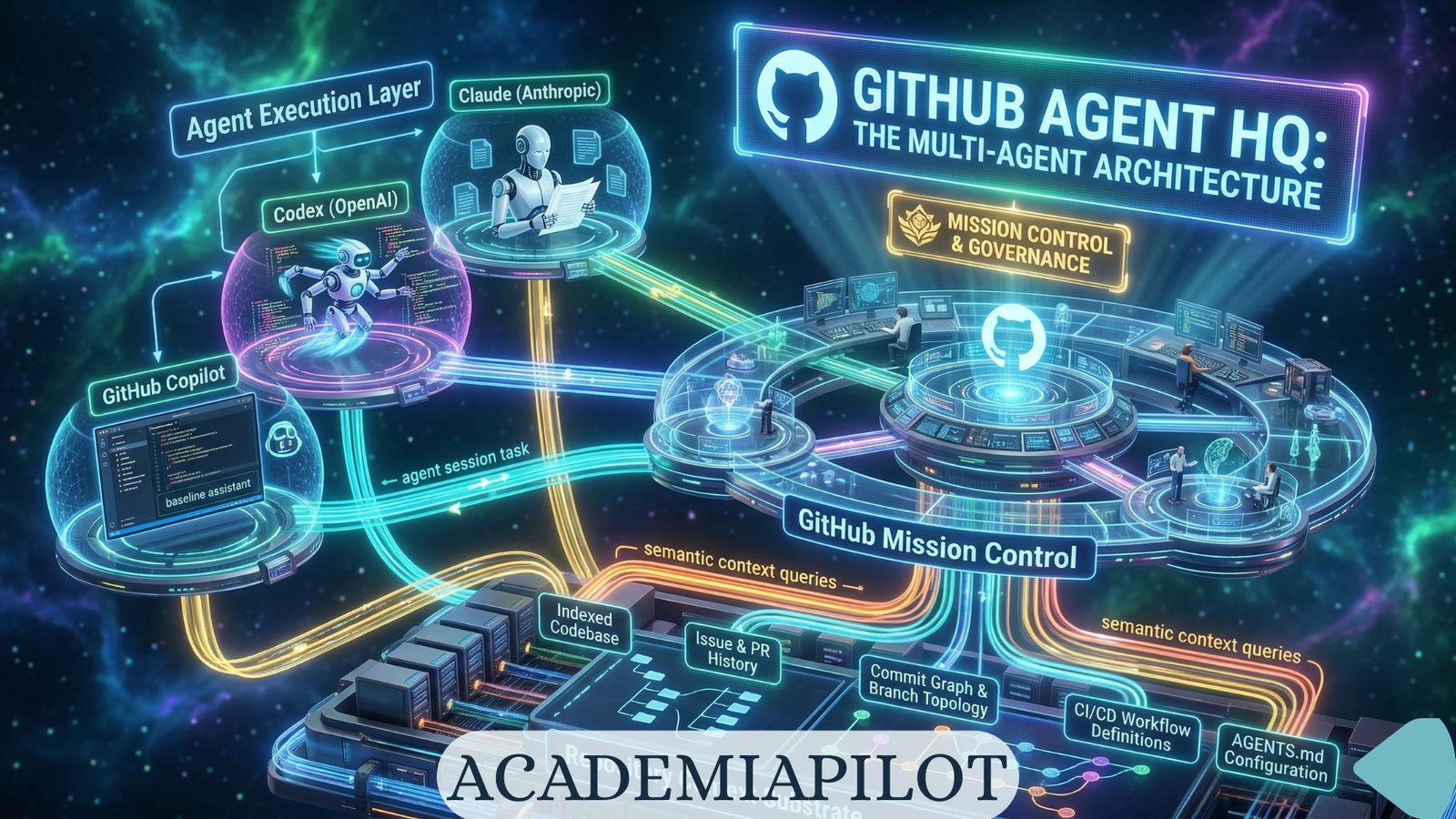
Component 1: Mission Control (Unified Command Layer) Mission Control is a unified command center that follows you wherever you work. It's not a single destination; it's a consistent interface across GitHub, VS Code, mobile, and the CLI that lets you direct, monitor, and manage every AI-driven task.
Component 2: Agent Execution Layer The execution environment where agents operate. Each agent — Claude, Codex, Copilot, or a custom agent — runs with a scoped GitHub token. GitHub's Agent HQ implements granular controls at the platform level.
Component 3: Control Plane (Enterprise Governance Layer) For enterprise administrators managing AI access. Set security policies, audit logging, and manage access all in one place. Enterprise admins can also control which agents are allowed, define access to models, and obtain metrics about Copilot usage in your organization.
Current Agent Availability
| Agent | Provider | Status (March 2026) | Subscription Required |
|---|---|---|---|
| GitHub Copilot | Microsoft/GitHub | GA | Copilot Pro/Pro+/Enterprise |
| Claude (Anthropic) | Anthropic | Public Preview | Copilot Pro+ or Enterprise |
| Codex | OpenAI | Public Preview | Copilot Pro+ or Enterprise |
| Devin (Cognition) | Cognition | In Development | TBA |
| Google Gemini | In Development | TBA | |
| Grok (xAI) | xAI | In Development | TBA |
How GitHub Agent HQ Works — Architecture Level
The Repository as Context Substrate
Every agent in Agent HQ operates against the same repository context. The repository context layer includes: the full codebase indexed at session start, issue and PR history, commit graph and branch topology, CI/CD workflow definitions, and AGENTS.md configuration directives.
AGENTS.md — The Agent Configuration Contract
AGENTS.md is the foundational project-level configuration file that defines how all agents operating on the repository should behave. Think of it like a README, but written specifically for AI agents instead of humans. You include project structure overview, build and test commands, code style guidelines, architecture patterns you follow, security requirements, and links to other documentation files.
Multi-Agent Task Execution Architecture
Multi-agent orchestration flows through Mission Control. Developer input arrives as a GitHub Issue, PR, or natural language task. Mission Control decomposes the task in Plan Mode (VS Code), routes to the appropriate agent per task type, and dispatches agents in parallel. The Agent Execution Layer generates code, tests, and PRs. The Control Plane audits, gates, and governs.
Why It Matters — The Shift to Multi-Agent Coding
The Single-Agent Ceiling
Every standalone AI coding tool — Cursor, Claude Code, Windsurf — operates on the same architectural constraint: one model, one context window, one conversation thread. This works for isolated tasks. It fails at SDLC scale.
Also read: Agentic IDEs vs Browser Builders (2026)
Different models have different strengths. Claude Code (Anthropic) prioritizes maintainability. Before generating code, Claude asks clarifying questions, explains reasoning mid-task, and interrupts work to verify alignment with requirements. OpenAI Codex optimizes for speed.
Also read: Claude AI Models Guide (2026): Haiku, Sonnet & Opus Compared
Running them simultaneously creates a compound system where Claude's precision and Codex's velocity operate on the same task simultaneously — producing output that neither alone would generate.
Deep Technical Breakdown
Agent Communication Protocols and MCP Integration
GitHub announced the GitHub MCP Registry, now available within VS Code. The MCP is the foundational standard that allows agents to interact with third-party application services, granting them specialized tool access to real-time, external data or capabilities.
Also read: MCP vs A2A: The Protocol War Defining AI Development in 2026
MCP servers available through the VS Code registry:
| MCP Server | Capability Granted to Agent | Use Case |
|---|---|---|
| Stripe | Payment API access | Billing feature development with live API |
| Sentry | Error monitoring data | Bug fix with actual error context |
| Figma | Design token access | UI component generation from actual design specs |
| GitHub | Extended repository operations | Cross-repo context and issue synthesis |
| Linear | Issue and project tracking | Task context from actual sprint data |
| Slack | Communication history | Context-aware PR descriptions |
FireCrawl MCP
Scrapes current API docs on-the-fly. Prevents hallucinating retired endpoints or obsolete syntax.
Supabase MCP
Reads your actual database structure. Agent cannot invent table names or column types that don't exist.
GitHub MCP
Fetches full issue history, PR comments, and linked commits. Stops agents from solving the wrong problem.
Browser MCP
Allows agents to "see" the running app via screenshots and recordings. Fixes UI regressions globally.
Performance and Cost Considerations
Copilot Pro+ subscribers ($39 monthly or $390 yearly) and Enterprise users activate Claude and Codex through repository settings. Each session consumes one premium request from their allocation.
| Session Type | Tokens per Session (Est.) | Cost Per Session | Appropriate For |
|---|---|---|---|
| Simple task (single agent) | 10K–40K | $0.05–$0.40 | Bug fixes, documentation |
| Parallel comparison (2 agents) | 20K–80K | $0.10–$0.80 | Architecture decisions |
| Full mission (3+ agents) | 50K–200K+ | $0.50–$2.00+ | Feature implementation |
| Enterprise long-running | 200K–1M | $2.00–$10.00 | SDLC automation |
The AGENT Method: Enterprise Implementation Framework
A proprietary phased framework for deploying GitHub Agent HQ in an organization from zero to governed, full-SDLC multi-agent operation.
AGENT: Audit → Govern → Execute → Tune
Phase 1: Audit — Repository Preparation and Guardrail Setup
Before deploying any agent, establish the configuration infrastructure and security baseline. Create AGENTS.md in every repository, configure branch protection rules, and set up MCP allowlists.
Phase 2: Govern — Control Plane Configuration
Configure the enterprise control plane before activating any third-party agent. Start with a pilot of GitHub Copilot only, then progressively add Claude Code, Codex, and custom agents with established behavior baselines.
Phase 3: Execute — Agent Role Deployment by Task Type
Match specific agents to specific task categories rather than deploying all agents on all tasks.
| Task Category | Primary Agent | Secondary Agent | Human Gate |
|---|---|---|---|
| Bug investigation and fix | Claude | Codex for implementation | PR review |
| Feature scaffolding | Codex | Copilot for completions | Plan approval + PR |
| Architecture review | Claude | — | Required review |
| Test generation | Copilot | Claude for edge cases | Coverage check |
| Security remediation | Claude | Copilot Autofix | Security team required |
Phase 4: Tune — Metrics, Scaling, and Governance Evolution
Measure, optimize, and extend agent usage based on verified impact data. Copilot metrics dashboard KPIs include PR throughput delta, time-to-merge for agent-initiated PRs, code quality score trend, agent session failure rate, and cost per merged PR.
Competitive Comparison
| Platform / Approach | Agent Depth | Repo Awareness | Automation Scope | Governance | Ideal Use Case |
|---|---|---|---|---|---|
| GitHub Agent HQ | Multi-agent (Claude + Codex + Copilot + Custom) | Native — repository-attached, AGENTS.md context | Full SDLC | Enterprise-grade | Enterprise teams needing governed multi-agent SDLC automation |
| GitHub Copilot (standalone) | Single agent | Repository-aware | Code completion, PR description | Standard GitHub permissions | Individual developers |
| Claude Code | Single agent (Claude) | Deep — MCP, CLAUDE.md | Terminal-native | Minimal governance | Solo developers and small teams |
| Cursor | Single agent (multi-model) | Strong — codebase indexing | Code editing, refactoring | Per-user settings | Daily coding in an IDE-native experience |
| Windsurf | Single agent + parallel | Strong | Code generation, debugging | Basic | IDE-focused teams |
| Devin (Cognition) | Single deep autonomous | Deep | End-to-end autonomous | Sandboxed | Complex autonomous tasks |
| Traditional CI/CD | No AI reasoning | Pipeline-defined | Build, test, deploy | Full | Deterministic automation |
Risks and Strategic Warnings
Risk 1: Error Cascade in Multi-Agent Chains
If one agent makes a mistake early in the workflow, downstream agents may compound that error before you catch it. Early Agent HQ users report this happening 5–10% of the time — requiring vigilant human oversight. The mitigation is mandatory Plan Mode approval before implementation.
Risk 2: Repository Corruption via Unconstrained Agents
An agent with write access to a repository and no AGENTS.md constraints will make autonomous architectural decisions based on training data — not your codebase's established patterns. Mitigation: AGENTS.md with explicit Protected Modules and Architecture Constraints sections.
Risk 3: Governance Fragmentation Without Centralization
As multiple AI agents proliferate, CIOs could face challenges similar to past SaaS governance issues. Agent HQ's control plane is the mitigation — but only if configured as the single governance authority.
Risk 4: Model Hallucination in Security-Critical Code
Agents generating code for authentication, payment processing, or encryption are operating in domains where a hallucinated function signature has immediate security implications. AGENTS.md should classify security-critical modules explicitly.
Risk 5: CI Cost Explosion Without Branch Controls
An organization that enables automated CI execution on all agent-created branches without approval gates will experience GitHub Actions bill spikes proportional to agent session volume. Set the branch control policy for agent-created branches explicitly.
Risk 6: Vendor Lock-In at the Governance Layer
Agent HQ's audit logs, control plane, and AGENTS.md configuration are GitHub-native. Export audit logs to a vendor-neutral SIEM system and maintain AGENTS.md as a portable plain-Markdown standard.
Mistakes Most Teams Will Make
Deploying agents without AGENTS.md. Activating all three agents simultaneously on day one. Not enforcing Plan Mode approval before execution. Treating agents like scripts. Ignoring the audit log until an incident occurs. Giving agents access to production branches. Skipping CodeQL on agent-generated code.
Also read: Vibe Coder's Survival Guide
Future Outlook
The SDLC Transformation Timeline (2026–2028): By 2027, the distinction between CI/CD pipelines and agent plans will functionally disappear. Continuous integration and continuous delivery pipelines used to be linear — Agent HQ nudges teams toward adaptive automation where agents dynamically respond to pipeline signals.
GitHub's strategic calculation is explicit: platform power over AI exclusivity. By welcoming Anthropic, OpenAI, Google, Cognition, and xAI into its governance infrastructure, GitHub is betting that developers will remain on GitHub regardless of which model is best.
As AI agent governance becomes a compliance requirement rather than a best practice, Agent HQ's built-in audit trail, identity management, and policy enforcement infrastructure becomes a procurement differentiator — particularly for organizations in regulated industries (finance, healthcare, legal).
Frequently Asked Questions
Common questions about this topic
Don't Miss the Next Breakthrough
Get weekly AI news, tool reviews, and prompts delivered to your inbox.
Related Articles
Master Claude in 2026: Every Anthropic Tutorial, Course & Feature Explained
The complete guide to Anthropic's Claude learning resources in 2026 — Cowork, Claude Code, Skills, Artifacts, and industry-specific tracks.
MCP vs A2A: The Protocol War Defining AI Development in 2026
MCP has 97M monthly SDK downloads. A2A launched with 50+ enterprise partners. These two protocols are reshaping how AI agents connect — and every developer needs to understand both.
Gemini Models 2026: Complete Guide
Your complete 2026 guide to Google Gemini AI models. Learn about Gemini Flash, Gemini 3, Gemini 3.1 Pro, API integration, and full competitor comparisons.